
Process automation in building Anki vocabulary cards
For the last two years, I’ve been working through a 10,000 word Russian vocabulary ordered by frequency. I have a goal of finishing the list before the end of 2019. This requires not only stubborn persistence but an efficient process of collecting the information that goes onto my Anki flash cards.
My manual process has been to work from a Numbers spreadsheet. As I collect information about each word from several websites, I log it in this table.
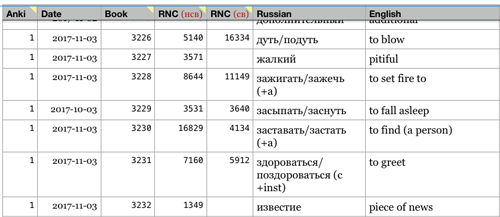
For each word, I do the following:
- From Open Russian I obtain an example sentence or two.
- From Wiktionary I obtain, the definition, more example phrases, any particular grammatical information I need, and audio of the pronunciation if it is available. I also capture the URL from this site onto my flash card.
- From the Russian National Corpus I capture the frequency according to their listing in case I want to reorder my frequency list in the future.
This involves lots of cutting, pasting and tab-switching. So I devised an automated approach to loading up this information. This most complicated part was downloading the Russian pronunciation from Wiktionary. I did this with Python.
Downloading pronunciation files from Wiktionary
class WikiPage(object):
    """Wiktionary page - source for the extraction"""
    def __init__(self, ruWord):
        super(WikiPage, self).__init__()
        self.word = ruWord
        self.baseURL = u'http://en.wiktionary.org/wiki/'
        self.anchor = u'#Russian'
    def url(self):
        return self.baseURL + self.word + self.anchor
First, we initialize a WikiPage object by building the main page URL using the Russian word we want to capture. We can capture the page source and look for the direct link to the audio file that we want:
def page(self):
        return requests.get(self.url())
def audioLink(self):
    searchObj = re.search("commons(\\/.+\\/.+\\/Ru-.+\\.ogg)", self.page().text, re.M)
    return searchObj.group(1)
The function audioLink returns a link to the .ogg file that we want to download. Now we just have to download the file:
def downloadAudio(self):
    path = join(expanduser("~"),'Downloads',self.word + '.ogg')
    try:
        mp3file = urllib2.urlopen(self.fullAudioLink())
    except AttributeError:
        print "There appears to be no audio."
        notify("No audio","Wiktionary has no pronunciation", "Pronunciation is not available for download.", sound=True)
    else:
	    with open(path,'wb') as output:
            output.write(mp3file.read())
Now to kick-off the process, we just have to get the word from the mac OS pasteboard, instantiate a WikiPage object and call downloadAudio on it:
word = xerox.paste().encode('utf-8')
wikipage = WikiPage(word)
if DEBUG:
    print wikipage.url()
    print wikipage.fullAudioLink()
wikipage.downloadAudio()
If you’d like to see the entire Python script, the gist is here.
Automating Google Chrome
Next we want to automate Chrome to pull up the word in the reference websites. We’ll do this in AppleScript.
set searchTerm to the clipboard as text
set openRussianURL to "https://en.openrussian.org/ru/" & searchTerm
set wiktionaryURL to "https://en.wiktionary.org/wiki/" & searchTerm & "#Russian"
There we grab the word off the clipboard and build the URL for both sites. Next we’ll look for a tab that contains the Russian National Corpus site and execute a page search for our target word. That way I can easily grab the word frequency from the page.
tell application "Google Chrome" to activate

-- initiate the word find process in dict.ruslang.ru
tell application "Google Chrome"
	--	find the tab with the frequency list
	set i to 0
	repeat with t in (every tab of window 1)
		set i to i + 1
		set searchURLText to (URL of t) as text
		if searchURLText begins with "http://dict.ruslang.ru/" then
			set active tab index of window 1 to i
			exit repeat
		end if
	end repeat
end tell

delay 1

tell application "System Events"
	tell process "Google Chrome"
		keystroke "f" using command down
		delay 0.5
		keystroke "V" using command down
		delay 0.5
		key code 36
	end tell
end tell
Then we need to load the word definition pages using the URLs that we built earlier:
-- load word definitions
tell application "Google Chrome"
	activate
	set i to 0
	set tabList to every tab of window 1
	repeat with theTab in tabList
		set i to i + 1
		set textURL to (URL of theTab) as text
		-- load the word in open russian
		if textURL begins with "https://en.openrussian.org" then
			set URL of theTab to openRussianURL
		end if
		-- load the word in wiktionary
		if textURL begins with "https://en.wiktionary.org" then
			set URL of theTab to wiktionaryURL
			--	make the wiktionary tab the active tab
			set active tab index of window 1 to i
		end if
	end repeat
end tell
Finally, using do shell script we can fire off the Python script to download the audio. Actually, I have the AppleScript do that first to allow time to process the audio as I’ve described previously. Finally, I create a Quicksilver trigger to start the entire process from a single keystroke.
Granted, I have a very specific use case here, but hopefully you’ve been able to glean something useful about process automation of Chrome and using Python to download pronunciation files from Wiktionary. Cheers.