
Fixing a couple of vexing PartKeepr errors
I use PartKeepr to maintain my electronics laboratory parts inventory. The problem is that the technology is old and the project has been mothballed. There are hundreds of open issues on GitHub. It’s a little sad, but I have too much time and effort invested to give up on it now. The two errors are these: one pertains to an outdated database schema (it isn’t), and the other refers to a cron job that prepares usage tips.
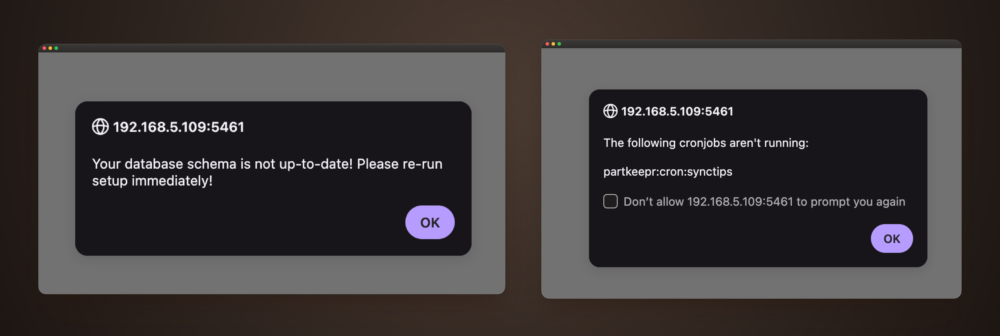
The cron job cannot run properly because the source of its JSON is defunct. It is perpetually looking for a URL that no longer exists, so it cannot complete and its execution log never appears in the database. The result is the same warning on every login.
The database schema error is a false positive caused by PartKeepr’s older Doctrine DBAL schema comparator. It sees a difference between the database schema and the entity definitions even though the MariaDB columns already have the expected definitions. Re-running setup does not help, because the comparator keeps generating the same ALTER TABLE ... CHANGE ... DEFAULT NULL statements.
Fixing the synctips cron job error
This was the most vexing error to fix. Trying to identify the right failure point to patch inside the Docker container led to a bunch of dead ends, so I instead installed a Violentmonkey userscript to nix the alert. Create a new userscript, replace its contents with this, then save and enable it:
// ==UserScript==
// @name         PartKeepr Warning Filter
// @match        http://192.168.5.109:5461/*
// @run-at       document-start
// @grant        none
// ==/UserScript==

(function () {
    'use strict';

    const originalAlert = window.alert;

    window.alert = function (message) {
        if (typeof message === 'string' &&
            /cron/i.test(message)) {
            console.log('Suppressed PartKeepr warning:', message);
            return;
        }

        return originalAlert.call(this, message);
    };
})();
Reload PartKeepr and log in again. The @match entry must exactly match the address you use to access PartKeepr, including its scheme and port. Use your own IP address and port - this is mine. This userscript dismisses only alerts whose text includes cron; any other browser alerts still appear normally.
Suppressing the database schema error
PartKeepr determines this warning in /app/src/PartKeepr/CoreBundle/Services/SystemService.php. Its getSchemaStatus() method calls Doctrine’s schema comparator, and any generated SQL marks the schema as incomplete. The direct fix is to make that method return complete.
First, copy the application file out of the container and make a backup:
docker cp \
    partkeepr-partkeepr-1:/app/src/PartKeepr/CoreBundle/Services/SystemService.php \
    ./SystemService.php

cp -p SystemService.php SystemService.php.orig
Open SystemService.php in your editor. Search for the getSchemaStatus() method definition and replace the entire method with:
protected function getSchemaStatus()
{
    return 'complete';
}
Before installing the change, copy the file to a temporary path in the container and check its syntax:
docker cp SystemService.php partkeepr-partkeepr-1:/tmp/SystemService.php

docker exec partkeepr-partkeepr-1 \
    php -l /tmp/SystemService.php
The lint command should report No syntax errors detected. Copy the patched file into place and restore the original ownership and permissions:
docker cp SystemService.php \
    partkeepr-partkeepr-1:/app/src/PartKeepr/CoreBundle/Services/SystemService.php

docker exec -u root partkeepr-partkeepr-1 \
    chown www-data:www-data \
    /app/src/PartKeepr/CoreBundle/Services/SystemService.php

docker exec -u root partkeepr-partkeepr-1 \
    chmod 644 \
    /app/src/PartKeepr/CoreBundle/Services/SystemService.php
Finally, clear Symfony’s production cache and restart the container:
docker exec -u www-data partkeepr-partkeepr-1 \
    php /app/app/console cache:clear --env=prod --no-debug

docker restart partkeepr-partkeepr-1
The schema warning is gone after the restart.
Making the patch survive container recreation
A docker cp change survives a normal restart but is replaced when Docker recreates the container. Keep the patched SystemService.php and its .orig backup on the host, then mount the patched file through your Compose configuration:
services:
  partkeepr:
    volumes:
      - ./patches/SystemService.php:/app/src/PartKeepr/CoreBundle/Services/SystemService.php:ro
Add the mount alongside the service’s existing volume entries, put the patched file at ./patches/SystemService.php, and recreate the service. The patched schema-status check will then be applied whenever the PartKeepr container starts. I’m still a little unsure about this. If I had more time, I’d mess around with the source code on a fork and deal with it that way.
This is a janky workaround for an old application that still works for me otherwise. If you know of a cleaner way to fix PartKeepr’s warnings, or if you have questions or comments, please get in touch through my contact page.