Indigo

Thursday, September 10, 2026

Cylindrical Mac Pro with the slogan: Built for creativity on an epic scale.

Worked much of the early morning on a reliable backup process for my Indigo data. For many years - at least a decade - my Indigo instance has run on an old “Trashcan” Mac Pro. I honestly cannot believe that the thing is running still. It’s from the Intel Mac era of course, circa 2014 and produces an incredible amount of heat. Yet someshow it just keeps on ticking. But I imagine its days are numbered, so I’ve been thinking a lot lately about what will happen when it dies completely. Obviously recreating my Devices, Variables, Actions, Triggers and Schedules is the most important. With dozens, maybe hundreds of bespoke and interlocking scripts, it would be a major undertaking to create it all from scratch.

Exporting Indigo device list to CSV

Indigo device list

Sometimes I find myself needing to code something for Indigo, the macOS home automation application, and I would like to have my list of devices available. Rather than connect to my Indigo server to look up each device’s name or ID, it would be convenient to have a list at hand whenever I need it.

You can run the following script in the Indigo scripting shell, opened via Plugins > Open Scripting Shell in Indigo. The script exports device names, IDs, and descriptions to a CSV file, sorted alphabetically by folder and then by device name. Device descriptions appear in the Notes column. Devices outside a folder appear under (no folder).

Indigo actions are not guaranteed to execute sequentially

Although I’ve used Indigo — the macOS home automation ecosystem — for over a decade, I never picked up on the fact that Actions attached to Schedules, Triggers, and web UI elements are not executed sequentially. The application user interface strongly implies sequential execution, but not only is that not guaranteed, the app actually attempts to execute the actions in parallel.

See this note buried in the documentation:

Important! While you can order the actions in any order you like, Indigo will attempt to execute all actions in parallel. It’s not always possible for various reasons, but that’s the intent. If you want to order the execution, then you’ll need to add delays which will delay the action’s execution from the time of the event. So, if you have 3 actions and you want the first to execute immediately, the second to execute a minute after the event, and the third to execute two minutes after the event, then add a one minute delay to the second and a two minute delay after the third.
An approach to dealing with spurious sensor data in Indigo

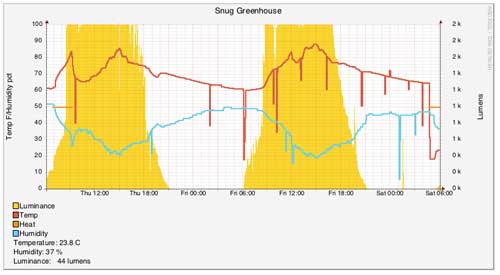
Spurious sensor data can wreak havoc in an otherwise finely-tuned home automation system. I use temperature data from an Aeotech Multisensor 6 to monitor the environment in our greenhouse. Living in Canada, I cannot rely solely on passive systems to maintain the temperature, particularly at night. So, using the temperature and humidity measurements transmitted back to the controller over Z-wave, I control devices inside the greenhouse that heat and humidify the environment.

Using rrdtool to chart Indigo data

Indigo currently shipping version 7 is a leading Mac home automation software package. One of it’s mostly widely-used features is its ability to execute user-provided Python scripts of AppleScripts. In my previous introduction to scripting Indigo with Python I showed how to use the Indigo plugin host to execute Python scripts. In this post, I’ll describe how I use a third-party charting package rrdtool to graph data from Indigo by taking advantage of Indigo’s ability to execute arbitrary Python scripts. This tutorial is focused on using Python as a bridge between Indigo 7 and rrdtool. If you are interested in a solution that takes advantage of AppleScript and bash scripts to do the samee thing, see this thread on the Indigo forums.

Dynamic UI lists in Indigo 6

Indigo 6 is a popular home automation controller software package on the Mac. Extensibility is one of its main features and it allows users to add a range of features to suit their needs.

Using Python scripting, users can create plugins that provide extended functionality. These plugins can provide a custom configuration UI to the user. Since the documentation around a particular feature - dynamic lists was lacking, I’ve written up my approach here.