Thursday, January 29, 2026
- Indigo macOS home automation software actions that are assigned to a
Trigger,Scheduledor web UI element are not executed sequentially. Design accordingly to avoid race conditions.
Trigger, Scheduled or web UI element are not executed sequentially. Design accordingly to avoid race conditions.Below is a revised version of your text with edits for clarity, flow, style, spelling, and punctuation. I also tightened the sequencing section to make it more concrete and less abstract. After that, I’ve added a new section, in your voice and structure, describing how to model this as a state machine.
Although I’ve used Indigo — the macOS home automation ecosystem — for over a decade, I never picked up on the fact that Actions attached to Schedules, Triggers, and web UI elements are not executed sequentially. The application user interface strongly implies sequential execution, but not only is that not guaranteed, the app actually attempts to execute the actions in parallel.
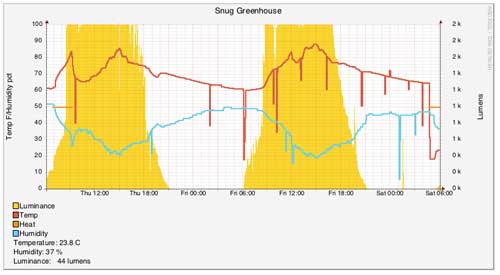
Spurious sensor data can wreak havoc in an otherwise finely-tuned home automation system. I use temperature data from an Aeotech Multisensor 6 to monitor the environment in our greenhouse. Living in Canada, I cannot rely solely on passive systems to maintain the temperature, particularly at night. So, using the temperature and humidity measurements transmitted back to the controller over Z-wave, I control devices inside the greenhouse that heat and humidify the environment.
rrdtool to graph data from Indigo by taking advantage of Indigo’s ability to execute arbitrary Python scripts. This tutorial is focused on using Python as a bridge between Indigo 7 and rrdtool. If you are interested in a solution that takes advantage of AppleScript and bash scripts to do the samee thing, see this thread on the Indigo forums.
I’ve used Indigo home automation software for a few years. It’s a integrated home automation software environment for the Mac and its a solid stable and well-supported platform.
Within Indigo, it’s possible to script triggers and actions either AppleScript or Python. It’s funny - AppleScript often looks like the easier route to take. It looks more like plain English than Python. But as they say, looks are deceiving. Two bits of bad news put the nail in AppleScript’s coffin for me - as least with Indigo.

Indigo is a well-known home automation controller software package for Mac OS X. I’ve written a plugin for Indigo 6 that allows you to create a virtual weather station from Environment Canada data. If you live in Canada, this will be a useful way of using weather data in your Indigo rules. For example, you could use wind and temperature data to adjust your irrigation schedule.
You can download the plugin from its git repo. After downloading the files, you’ll just need to configure them as a plugin. To do this, create a new folder and rename it EC.indigoPlugin. Copy the Contents folder that you just downloaded. Right-click on the EC.indigoPlugin bundle and Show Package Contents. Paste the Contents folder here. To install in Indigo, double-click the bundle file.
Indigo 6 is a popular home automation controller software package on the Mac. Extensibility is one of its main features and it allows users to add a range of features to suit their needs.
Using Python scripting, users can create plugins that provide extended functionality. These plugins can provide a custom configuration UI to the user. Since the documentation around a particular feature - dynamic lists was lacking, I’ve written up my approach here.