
Exporting Indigo device list to CSV
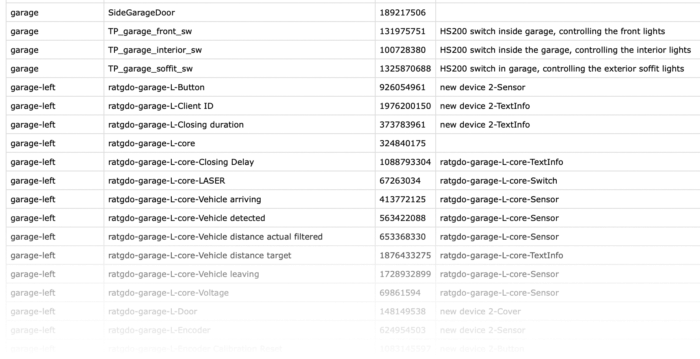
Sometimes I find myself needing to code something for Indigo, the macOS home automation application, and I would like to have my list of devices available. Rather than connect to my Indigo server to look up each device’s name or ID, it would be convenient to have a list at hand whenever I need it.
You can run the following script in the Indigo scripting shell, opened via Plugins > Open Scripting Shell in Indigo. The script exports device names, IDs, and descriptions to a CSV file, sorted alphabetically by folder and then by device name. Device descriptions appear in the Notes column. Devices outside a folder appear under (no folder).
Replace YOUR_USER_NAME in output_path with your macOS account’s short username. The file is written to the Desktop on the Mac running the scripting shell; you can change the path to another existing, writable folder if you prefer. Running the script again overwrites the previous export.
import csv

folders = {}

for folder in indigo.devices.folders:
    folders[folder.id] = folder.name

folders[0] = "(no folder)"  # unfiled devices

output_path = "/Users/YOUR_USER_NAME/Desktop/indigo_devices_by_folder.csv"

rows = []
for dev in indigo.devices:
    folder_name = folders.get(dev.folderId, f"Unknown folder {dev.folderId}")
    rows.append((folder_name, dev.name, dev.id, dev.description))

rows.sort(key=lambda r: (r[0].lower(), r[1].lower()))

with open(output_path, "w", newline="") as f:
    writer = csv.writer(f)
    writer.writerow(["Folder", "Device", "Device ID", "Notes"])
    writer.writerows(rows)

indigo.server.log(f"Wrote {len(rows)} devices to {output_path}")
The resulting CSV gives me a searchable reference that I can keep open in a spreadsheet while writing Indigo scripts. It is a snapshot of the device list, so I just rerun the export after adding, renaming, or moving devices to keep it current.
If you have questions or suggestions, please get in touch through my contact page.