
fancy_quote shortcode for Hugo for fancier quotes
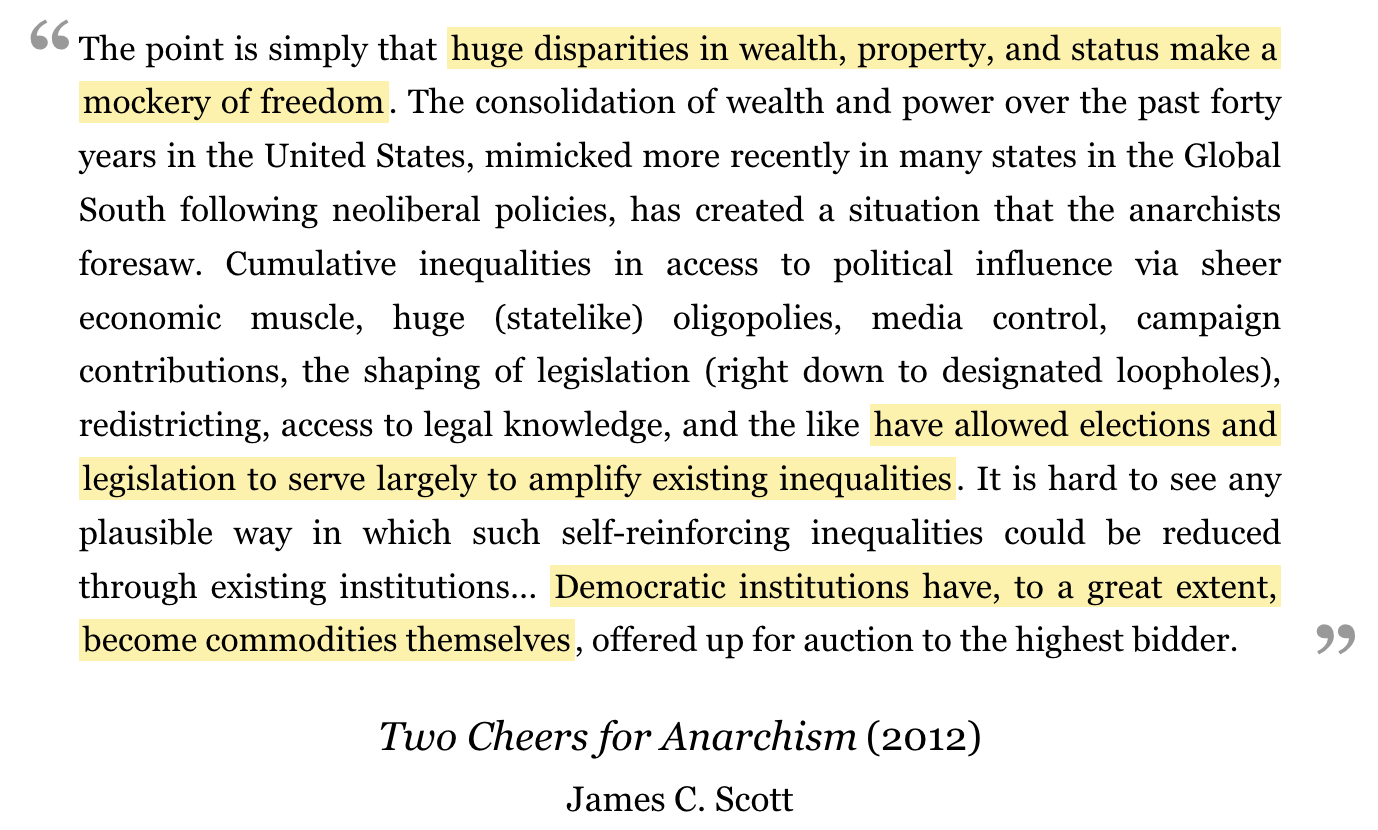
I often include quotations in blog posts, but a plain Markdown blockquote does not give much control over the presentation and attribution. I wanted a reusable component that would keep the quote, author, source and publication year visually consistent without requiring me to reproduce the same HTML in every post.
The result is a fancy_quote shortcode, which adds large typographic quotation marks, centres the source and author beneath the quotation, and allows one or more passages to be highlighted with a simple ==highlighted text== notation.
Features
- The quotation can be written between the shortcode’s opening and closing tags or supplied through a
textparameter. author,sourceandyearare optional named parameters.- Any number of ranges can be highlighted.
- Highlighted passages use the semantic HTML
<mark>element rather than a purely decorative<span>. - Highlights can wrap across lines without losing their padding.
- Existing quotations without highlights continue to render normally.
- The appearance is controlled entirely by CSS and can be adapted to any theme.
Hugo version
The shortcode requires Hugo 0.16 or newer. The limiting feature is replaceRE, which converts the highlight delimiters into <mark> elements and was added in the Hugo 0.16 release. The other pieces use the standard shortcode .Get and .Inner methods and the long-established safeHTML alias for safe.HTML.
I developed and tested this version with Hugo 0.165.0. It does not require Hugo Extended, JavaScript, or any external library.
The shortcode
Create layouts/shortcodes/fancy_quote.html in the root of the Hugo project:
{{ $year := .Get "year" }}
{{ $text := .Get "text" | default .Inner }}
{{ $author := .Get "author" }}
{{ $source := .Get "source" }}
{{ $text = replaceRE `==([^=]+?)==` `<mark class="quote-highlight">$1</mark>` $text }}

<div class="fancy-quote">
  <p class="quote-text">{{ $text | safeHTML }}</p>

  {{ if or $source $year }}
  <div class="quote-meta">
    {{ if $source }}
    <span class="quote-source">{{ $source }}</span>
    {{ end }}
    {{ if $year }}
    <span class="quote-year">({{ $year }})</span>
    {{ end }}
  </div>
  {{ end }}

  {{ if $author }}
  <div class="quote-author">{{ $author }}</div>
  {{ end }}
</div>
The regular expression looks for text enclosed by pairs of equals signs. Each match is replaced by a <mark class="quote-highlight"> element. Piping the result through safeHTML prevents Hugo from escaping the generated element.
safeHTML should be used only with content that I control. If quotation text comes from an untrusted visitor, CMS user, or external feed, it should be sanitised rather than passed through this shortcode unchanged.
The CSS
Here is the complete stylesheet:
.fancy-quote {
  font-family: "Georgia", "Times New Roman", serif;
  line-height: 1.6;
  max-width: 100%;
}

.quote-text {
  position: relative;
  text-align: justify;
  margin-bottom: 1rem;
  padding: 0.2rem 2.4rem 0.35rem;
  font-size: 1.05rem;
}

.quote-text::before,
.quote-text::after {
  position: absolute;
  color: #999;
  font-size: 2.75rem;
  font-weight: bold;
  line-height: 1;
}

.quote-text::before {
  content: "“";
  top: -0.15rem;
  left: 0.8rem;
}

.quote-text::after {
  content: "”";
  right: 0;
  bottom: -0.8rem;
}

.quote-highlight {
  color: inherit;
  background-color: #fff0a6;
  padding: 0.05em 0.12em;
  -webkit-box-decoration-break: clone;
  box-decoration-break: clone;
}

.quote-meta {
  display: flex;
  justify-content: center;
  align-items: baseline;
  gap: 0.25em;
  text-align: center;
  line-height: 1.3;
}

.quote-year {
  font-style: normal;
  font-size: 1.25rem;
  white-space: nowrap;
}

.quote-source {
  font-style: italic;
  font-size: 1.25rem;
}

.quote-author {
  display: block;
  text-align: center;
  margin-top: 0.25rem;
  margin-left: auto;
  margin-right: auto;
  font-size: 1.1rem;
}
The stylesheet can be saved as static/css/fancy-quote.css and included in the site’s <head>:
<link rel="stylesheet" href="/css/fancy-quote.css">Sites already using Hugo Pipes can instead keep the file under assets/css and add it to their existing CSS bundle.
Using the shortcode
A complete quotation looks like this:
{{< fancy_quote
  author="James C. Scott"
  source="Two Cheers for Anarchism"
  year="2012" >}}
The point is simply that ==huge disparities in wealth, property, and status make a mockery of freedom.== A second range can be ==highlighted independently==.
{{< /fancy_quote >}}
The highlight markers are optional. Without them, the entire quotation is displayed in the same style:
{{< fancy_quote author="Ursula K. Le Guin" >}}
The creative adult is the child who survived.
{{< /fancy_quote >}}
For a short quotation, the text can be supplied as a parameter and the closing tag omitted:
{{< fancy_quote
  text="The creative adult is the child who survived."
  author="Ursula K. Le Guin"
>}}
Optional adaptations
The shortcode parameters are independent. A quote can have an author but no source, a source and year but no author, or no attribution at all. The highlighting feature is also entirely optional.
The CSS is deliberately uncomplicated. The highlight colour can be changed through background-color, and the font, quotation-mark size, spacing and attribution alignment can all be altered without touching the shortcode. A dark theme might override the highlight colour inside its existing dark-mode media query:
@media (prefers-color-scheme: dark) {
  .quote-highlight {
    background-color: #665500;
  }
}
The shortcode intentionally treats its inner text as text with optional highlight markers, rather than running it through the Markdown renderer. That keeps its output predictable. If links, emphasis or other Markdown inside quotations become necessary, the rendering step could be extended with Hugo’s Page.RenderString method, with suitable care around generated and untrusted HTML.
For my purposes, this provides a small, readable content syntax while keeping all of the presentational machinery in one reusable place. If you have any difficulties, suggestions for improvements, please contact me via my contact page