
A better user experience when a Firefox extension loads a new tab custom page
N.B. This workaround is for macOS, using Keyboard Maestro. I have not tried equivalents elsewhere. On Windows, AutoHotkey can bind a hotkey, send Ctrl+T, select and clear the address bar, then Escape. On Linux, AutoKey is the usual analogue; under Wayland you may need something like ydotool. The Firefox new-tab focus behaviour itself is not macOS-specific.
In the previous post I described Slinky, a self-hosted start page, and mentioned that I use the New Tab Override extension so Firefox opens it on every new tab. That works, but the default behaviour is a little ugly.
Firefox puts the cursor at the beginning of the address bar when a new tab opens. So if I create a tab to search for “dog food” my sequence of actions would typically be:
- Command+T to create new tab.
- Slinky page opens as expected.
- Start typing “dog food” but notice that what appears in the URL bar is
dog foodhttp://<slinky address>.
There’s a lot of discusson on Bugzilla about this. The bottom line is that this is intended behaviour for Firefox. They don’t want a situation where new tab creation goes to an anonymous location.
The way I work around this is to use ^T not ⌘T to create a new tab. And in Keyboard Maestro, which I’ve written a lot about, I have a Firefox-targeted macro that triggers on ^T and then:
- Creates a new tab with
⌘T. - Selects the URL bar contents.
- Deletes the contents.
- Escapes out of the URL bar.
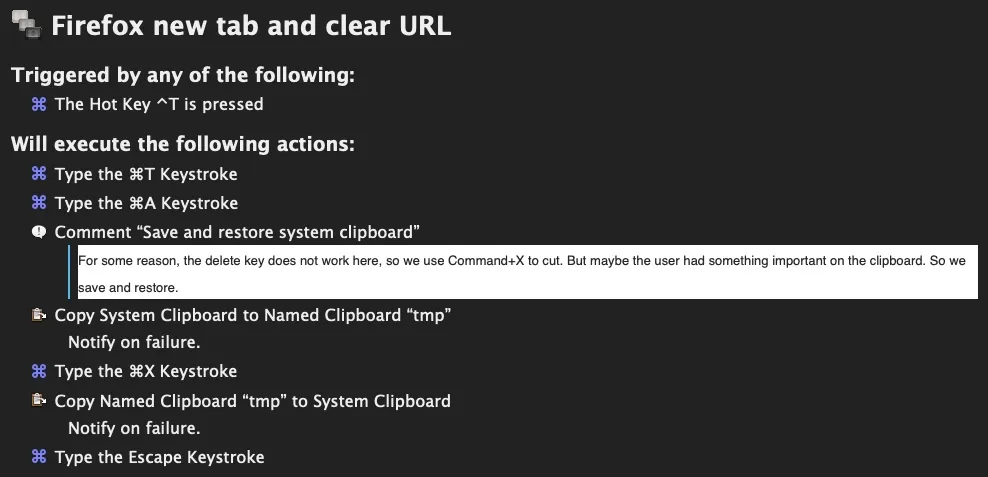
You can download the Keyboard Maestro macro Firefox new tab and clear URL from this site.
The rest of New Tab Override’s options — tab position, containers, a local HTML file instead of a URL — are documented in the extension and its README.
If you run into trouble, see my contact page.