
Setting up a multi-purpose iTerm2 profile for development
With time, I’ve come to prefer working more inside the terminal than in macOS GUI applications. This is particularly true when using agents to assist with tasks related to what I’m doing. For example, when writing for this blog, I usually keep a codex session going so that I can take advantage of it to do tasks like inserting images in the right way, linking to product URLs, cross-linking posts, etc. (No, I do not use LLM agents to write the text of this blog.) Both for coding and for writing, I’ve developed a tmux configuration that keeps everything in one terminal screen to reduce the amount of application and window switching.
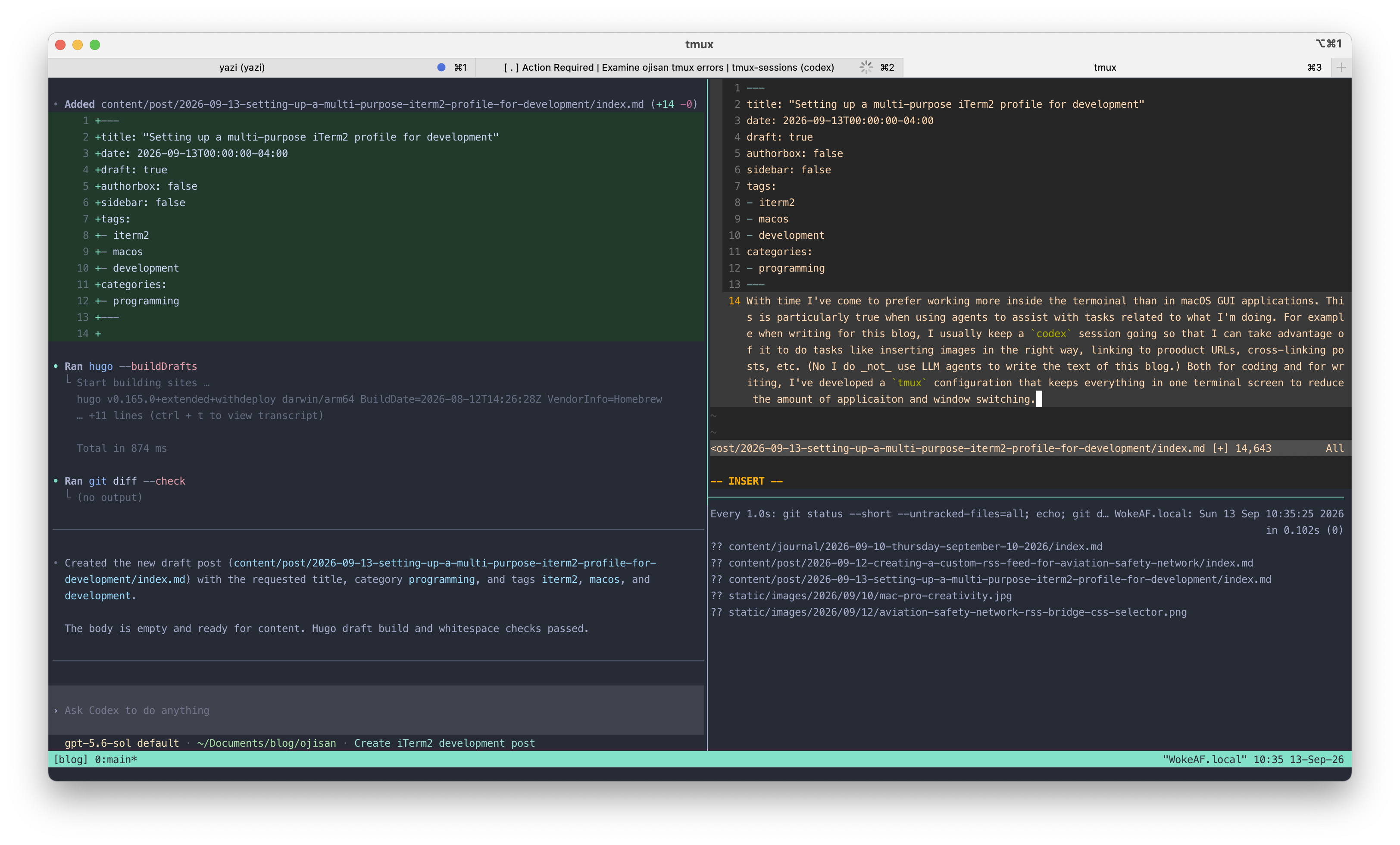
The following script sets up my terminal session just the way I want it. A codex session runs on the left, and the top right is available for editing with vim and related tasks. The bottom right is a session that watches changes in the repository. Alternatively, it could just be used for repository management without the watch feature.
#!/bin/zsh

SESSION="blog"
DIR="$HOME/Documents/blog/ojisan"

set -e

# Create the layout only when the session does not already exist.
if ! tmux has-session -t "$SESSION" 2>/dev/null; then
    # Create the session/window in the project directory.
    tmux new-session -d -s "$SESSION" -n main -c "$DIR"

    # Split into left and right halves.
    tmux split-window -h -t "$SESSION:main" -c "$DIR"

    # Split the right pane into upper and lower panes.
    tmux split-window -v -t "$SESSION:main.1" -c "$DIR"

    # Lower-right pane: continuously show git diff.
    tmux send-keys -t "$SESSION:main.2" \
        "watch -n 1 --color 'git status --short --untracked-files=all; echo; git diff --color=always; git diff --cached --color=always'" C-m
fi

# Start Codex in a new pane, or restart it when an existing pane is at a shell.
# Leave Codex (or any other foreground program) alone if it is already running.
LEFT_PANE="$SESSION:main.0"
case "$(tmux display-message -p -t "$LEFT_PANE" '#{pane_current_command}')" in
    zsh|bash|sh|fish|dash|ksh)
        tmux send-keys -t "$LEFT_PANE" 'codex' C-m
        ;;
esac

# Focus the Codex pane.
tmux select-pane -t "$SESSION:main.0"

# Attach.
tmux attach-session -t "$SESSION"
I use this code in an iTerm2 profile (Profiles > Command > /bin/zsh -lc '/Users/alan/Documents/dev/tmux-sessions/ojisan-tmux') so that when I select Profiles > ojisan, my session is set up exactly the way I want every time. The result looks something like this:
That’s it. Just something that makes my life 0.1% less irritating.
If you have questions or comments, please get in touch via my contact page.